Everyone eventually has to deal with a little belly fat — even those of us who naturally had flat stomachs in our younger years. But too much of this type of tissue can have a negative effect on your health. But how much is too much? That depends on several factors, but experts agree that if you're a woman with a waist circumference of 35 inches or more or a man with a waist measuring 40 inches or more, you're vulnerable to the dangers of belly fat.
It's not just about the way your jeans fit. Excess abdominal fat increases your odds of developing some serious diseases, including diabetes, dementia, heart disease and cancer. Want to tip the scales toward better health and a smaller waistline? Try these healthy techniques to help banish belly fat and get fitter.
Have you heard the saying "Great abs are made in the kitchen?" It's true — what you eat really matters. And that certainly applies to taking a healthy approach to losing belly fat. For starters, it helps to know what to eat — and what to avoid. Skip high-sugar foods and drinks. Take a hard pass on anything with high fructose corn syrup, chuck trans-fats from your pantry and limit your intake of processed white-flour breads and pastas. All of these foods can contribute to gaining belly fat.
Photo Courtesy: M_a_y_a/Getty Images
Instead, load up on fiber-rich foods; these can help you feel full longer by stabilizing hunger hormones so you don't want to eat as often. Whole grains, legumes, vegetables and fruits are all good sources of soluble fiber, your belly fat-fighting sidekick. High-protein foods, including fish, chicken, eggs and dairy, have also been shown to reduce belly fat gain. They can help keep you feeling full and boost your metabolism, too. Good-for-you fats like olive oil and avocados also contribute to satiety, meaning you'll stay full and, as a result, eat less.
Get Moving to Get Losing
There's no single exercise that can blast away belly fat. Experts agree that spot reduction, such as doing hundreds of daily situps and crunches to slim your waist, isn't the best or healthiest way to get the job done. You'll likely end up with rock-hard abs under a layer of pudge. Instead, look for workouts that combine strength training, cardio and core work to reduce body fat and whittle your middle. As an added bonus, regular exercise can lower your blood sugar levels, reduce inflammation and improve the metabolism issues associated with carrying excess belly fat.
Photo Courtesy: Diego Lezama/Getty Images
Even if you're new to fitness, you can start where you are. Go for a walk, hop on a stationary bike — just get moving. Running, walking, swimming and bicycling are all good ways to get your heart pumping. Start building fitness into your daily routine to make a habit of it. For example, you can start walking on your lunch breaks at work, or hop on the treadmill while your favorite TV show is airing. The less you have to go out of your way to get workouts in initially, the easier it'll be for you to make fitness a lifelong health-boosting habit and reach a healthy weight.
Lose the Lifestyle Limitations for Lasting Losses
Diet and exercise are important, but they're not the only things you need to address to shed stubborn belly fat. Reducing your alcohol intake, for example, is one beneficial adjustment you can make. Excessive alcohol consumption not only makes it easier to pack on pounds (it's all empty calories), but it also can damage your liver, increase your odds of developing health problems and increase inflammation. Alcohol has also been linked to suppressing your body's natural fat-burning abilities.
Photo Courtesy: PeopleImages/Getty Images
Other healthy changes to make include drinking more water every day, which can boost your metabolism and help flush toxins from your body. Reducing your stress levels is another key step. Stress is linked to higher levels of the hormone cortisol, which can cause your body to hold onto fat in your abdomen.
Lastly, make sure you prioritize getting a good night's sleep — every night. In one recent study from the journal SLEEP, researchers found a clear link between the amount of sleep people get every night and the amount of weight they gain, particularly around their midsections. Short sleepers, who sleep fewer than five hours every night on average, are at the highest risk of gaining abdominal fat. So rest up to boost your chances of maintaining a healthy weight.
Find a style guide template that you like and customize it for your brand to save time (and money) on creating your document from scratch.
When it comes to branding, we all know that consistency is key, but in order to achieve that you need a solid style guide.
This is especially true when you create a lot of branded content or work with many designers.
However—there's a problem:
Creating your guidelines can take a really long time—often long weeks or months.
That's why it's helpful to jump start your style guide creation with a great, design-ready template.
Thing about it—you have to figure out what to include, then lay out the content, design the book, write descriptions and annotations—the process can be very time consuming.
Save yourself time and effort by customizing one of the templates from my list that fits your needs best.
Whether you're looking for an InDesign, Photoshop, illustrator, Keynote, Powerpoint or even a GoogleSlides template—I got you covered.
Looking to creating a simple style guide or a comprehensive brand guidelines? In landscape or portrait orientation?
No matter what your preferences are, I include on my list something for everyone.
At the same time I also make sure that all templates are well designed.
Check out my list of 50+ best style guide templates to download in 2021.
Top 50+ Style Guide Templates:
One-Page Style Guide Templates
Logo & Identity Guidelines Templates
Professional Brand Guidelines Templates
Comprehensive Brand Book Templates
InDesign Brand Guideline Templates
Illustrator Brand Guideline Templates
Photoshop Style Guide Templates
Keynote Style Guideline Templates
Vertical Style Guide Templates
Horizontal Style Guide Templates
I organized them into 10 categories that feature top 5 templates in each one—making it a list of 50 templates total.
PS. If you want to learn how to create a style guide—check out my YouTube video.
1. One-Page Style Guide Templates
In the first category I feature just simple one-page templates, also called brand boards or style sheets—they will get you started with the basics.
A good brand board is an absolute must-have for any designer!
They simply show your client every element of their brand—all nicely presented on a single page document.
Brand boards are important because they help convey brand attributes, personality, and style at a glance.
When you view style sheets you can see every element of a brand on a single document—that's what makes it easy to access and use.
They simply help designers (and your client) maintain a unified visual identity across the board: from colors, to logo do's and dont's to typography and more.
Top 5 Best One-Page Style Guide Templates:
Brand Style Sheet Template
Brand Board Builder Template
Brand Mood Board & Style Tile Pack
One Page Personal Brand Style Guide
Branding Mood Board Template
2. Logo & Identity Style Guide Templates
In the second category I feature a bit more detailed logo & identity guideline templates that consist of more than just one page.
A solid logo & identity guidelines will take your designer career to the next level.
They include about two dozen of pages that cover everything from the logo mark, to alternative graphics, color scheme, typography, layout and much more.
They're much more detailed that style sheets and will definitely help you provide more value.
However, if you don't need certain elements—you can just delete pages or move things around and customize it for your specific needs.
If you're commissioned to design a logo and want to add more value to the project, providing an accompanying set of brand identity guidelines is the way to go.
Top 5 Best Logo & Identity Style Guide Templates
Logo Guidelines Template
Logo Style Guide Template
Logo & Brand Board Template for Canva
Logo & Branding Usage Guidelines
Logo Colour and File Usage Template
Use these minimalist templates, replace the content with your own and either print or save it as a pdf for the client.
Download Logo & Identity Style Guide Templates
3. Professional Style Guide Templates
If you're looking for a style guide template that looks even more professional and a bit more sophisticated—here's the list for you.
If you consider yourself a pro—focus on getting a professional-looking template.
Design agencies and experienced designers will use only the most professional-looking style guide templates to deliver work to their clients (as they want to look professional themselves).
These templates cover all aspects of brand design including: logo, colors, fonts, photography, web design, social media, stationery, packaging and more.
They're much more comprehensive that previously mention templates, so if you're going for that pro look—here's the list for you.
They also come in many different file formats: Photoshop, InDesign and Illustrator CC so that you can choose whichever you prefer.
Top 5 Most Professional Style Guide Templates
Minimalist Brand Identity Guide
Printable Style Guide
Clean Brand Guidelines
Landscape Brand Guidelines
Branding Presentation Template Sketch
If you looking for a professional template, any of the templates above could be your option.
The templates on this list consist of about 40 pages each—they're pixel perfect, with consistent style and usable copy that covers all brand assets.
Download Professional Style Guide Templates
4. Comprehensive Brand Book Templates
If none of the above templates are quite up to your liking—check out this list of the most comprehensive style guide templates I could find on the internet.
For top designers and experts—check out the all-inclusive brand book templates.
This is the ultimate selection of complete brand standard templates & kits—fresh and clean design with all things covered.
This list consists of all-inclusive templates that cover all necessary sections and often go beyond just graphics, including also strategy (mission, vision, personality, tone of voice etc.).
Of course they also cover all aspects of visual branding like: your logo, typography, colors, imagery, composition, illustrations, animations, packaging, web design, icons and more.
They might be a bit pricy, but they often come with full money-back guarantee and future updates for free.
Top 5 Most Comprehensive Brand Book Templates
Comprehensive Brand Guidelines Kit
Brand Standards Template
Brand Book & Style Guide Template
Elegant Brand Guidelines
Minimalist Brand Style Guide
Overall, they're very extensive yet still easily editable—just drop in your own images, fix some text, and it's ready!
Download Comprehensive Brand Book Templates
5. InDesign Style Guide Templates
You can use different applications to create your style guide, but InDesign templates are the most common.
Opt for Adobe InDesign to create a solid, multipage style guide.
InDesign is the best choice to design and publish multipage documents containing text, vectors, and images—this makes it a perfect software to design your guidelines.
These templates use master pages, paragraph styles, gird system, color swatches and other helpful tools to make your design process fast and enjoyable.
When using InDesign, everything can be easily be changed in one location (globally) and you can instantly publish your document to the cloud or export as a PDF.
All of these templates come with InDesign files (.INDD)—just drop in your own vectors, images and texts and you're good to go.
Top 5 Best InDesign Style Guide Templates
Brand Style Guide InDesign Template
InDesign Brand Style Guidelines
Brand Book InDesign Template
Clean Style Guide InDesign
Minimalist Identity Guidelines InDesign
I recommend all designers to use InDesign to create their style guides, but if you're not familiar with it—below I feature templates for other Adobe CC apps like Illustrator and Photoshop.
Download InDesign Style Guide Templates
6. Illustrator Style Guide Templates
If you're not familiar with InDesign (like many designers), then check out my templates for Adobe Illustrator.
Most designers are more comfortable with Illustrator—it's the next best app to get your style guide done.
Illustrator offers options for developing print and digital designs which makes it still a great option to go for when designing your guidelines document.
For those who work on a branding project using a design-ready Illustrator template is an effective way to introduce the new brand (since Illustrator is used for logo design as well).
That's why I've compiled a list of some of the best illustrator templates that come with flat, clean, classic and minimalist style.
All of these templates come with Illustrator files (.Ai, .EPS)—just add images, vectors and texts and the style guide will be ready to send to your client.
Top 5 Best Illustrator Style Guide Templates
Illustrator Brand Guidelines Template
Illustrator Brand Style Guide
Minimalist Style Guide Illustrator
Professional Logo Guidelines Illustrator
Illustrator Logo Guidelines Template
Choose any of the above templates to make your branding presentation stand out and look professionally.
Don't spend time creating your own style guide from scratch—just download one of these great templates to create your style guide in Illustrator fast and easy.
Download Illustrator Style Guide Templates
7. Photoshop Style Guide Templates
While Photoshop is NOT preferred choice to use when creating your style guide—it can be used if you don't know illustrator or InDesign.
Adobe Photoshop is known to most designers which makes it a great app to create your guidelines.
Adobe Photoshop is a critical tool for any graphic designer, which makes it super accessible if you don't want to learn how to use proper software like illustrator or InDesign.
All of these style guide templates are available in both A4 and US letter sizes, so that you can use them successfully all over the world.
They focus on simple clean style and a strong grid layout which makes it a perfect choice if your brand identity is modern and minimalist as well.
As we all know—It's easy to edit things in Photoshop (especially with SmartObjects) therefore you can customize these templates up to your liking.
They all come with Photoshop files (.PSD)—just add your logo, edit the colors and fonts and voila!
Top 5 Best Photoshop Style Guide Templates
Photoshop Brand Style Guidelines
Photoshop Branding Guidelines Templates
Minimalist Guidelines Template Photoshop
Photoshop Brand Book & Style Guide
Branding & Logo Guidelines Photoshop
These templates are created in order to be used by everyone with just basic knowledge of Adobe Photoshop—which makes it very convenient for all graphic designers.
Download Photoshop Style Guide Templates
8. Keynote Style Guide Templates
If you're not a designer per se, then you can use basic presentation software to build your style guide—Keynote being one of them.
Use Keynote to get your style guide done, if you're not familiar with Adobe products.
Keynote is an easy to use (and standard) presentation software on Mac, which makes it a great tool to build your style guide.
Every of these style guide templates includes pages that are unique—not just repetitive layout.
You don't have to buy Adobe CC, just using Keynote alone you can create gorgeous brand guidelines for your brand.
Any of the below listed style guide templates will work for you if you're into modern & sleek look.
Top 5 Best Keynote Style Guide Templates
Keynote Brand Guidelines
Brand Style Guide Keynote Template
Branding Guidelines PowerPoint
Keynote Brand Style Guidelines
Alternatively, check out this great PowerPoint style guide template if you're on Windows.
Download Keynote Style Guide Templates
9. Vertical Style Style Guide Templates
Most style guide templates will come in landscape orientation, but if you're fixed on portrait mode—here's the list for you.
Opting for portrait orientation will make your style guide easy to print and use in physical form.
In my other article on how to create a style guide, I recommend landscape letter size format so that you can use it for both: print and digital.
However, if for any reason you prefer vertical orientation—here are my top 5 picks for you.
The only downside of using vertical page orientation is the fact that most screens are horizontal (laptops, monitors, TVs).
Therefore your style guide might not look as good on screen as it looks in print (you will get horizontal bars on full screen).
However, if you prefer portrait orientation—I've put together a list of 5 best style guide templates for your inspiration.
Top 5 Best Vertical Style Guide Templates
Vertical Brand Book Guidelines
Vertical Brand Standards Book Template
Vertical Branding Style Guide
Brand Style Guide Layout Portrait
Vertical Brand Sheets Kit
All of the above templates has everything you need to flesh out a fully complete brand style guide.
From the color and image guidelines to font choices and logo placement rules, this list of vertical style guide templates has you covered.
Download Vertical Style Guide Templates
10. Horizontal Style Guide Templates
As said before, it's recommended to use landscape orientation for brand guidelines development these days because they can be easily printed out or viewed on screens.
Landscape orientation will make your style guide easy to view in digital as well as print.
If you want to ensure that your guide can be easily viewed in both print and digital, you can even go a step further and opt for specific size (A4 or Letter).
I like to design style guides for my clients in landscape orientation and letter size, so that they can be easily printed, or viewed comfortably on a monitor as well.
All of these templates are highly focussed on a minimalist approach featuring bold typography, a clean colour palette and flexible layout choices to help you easily customize them to your own liking.
The templates include chapters like: logo, typography, colour, photography, logo misuses, social media and more.
Top 5 Best Horizontal Style Guide Templates
Horizontal Brand Book Template
Clean Horizontal Guidelines
Minimalist Horizontal Brand Guidelines
Landscape Logo Guidelines
Horizontal Brand Manual Template
All of these templates come with files that are fully editable and are both: print and digital ready.
Download Horizontal Style Guide Templates
Conclusions
As a brand designer, one of the most important documents you can provide your clients with is a brand style guide—but designing one ain't easy.
It's clever to speed up your process with a design-ready, well-structured style guide template.
Whether you're a graphics designer who works with InDesign, Illustrator or Photoshop, or perhaps you prefer using apps like Google Slides, PowerPoint or Keynote—I've got you covered.
My list of the 50+ best style guide includes something for everyone—from simple one-page style sheets to more comprehensive brand guidelines and beyond.
Also check out my new product—The Brand Guidelines Kit—a whooping 70 pages template with a real style guide example included (brand guideline I developed for one of my clients).
Whether you're a brand designer or an agency—I hope you'll find a great template to customize for your needs.
Also check out my other relevant articles:
100 Best Style Guide of Famous Brands
10 Best Examples of Brand Guidelines Online
How To Create A Brand Style Guide
Do you have a great style guide template to add to the list?—Leave a comment below.
You know you've gotta drum up fresh social media content ideas to keep your followers interested and attract new people to your account. But it can be downright exhausting to be creative every day and deliver content gold on multiple platforms.
So we're here to help. With this cheatsheet of solid content ideas for each major social channel, you'll keep your social media strategy ahead of the curve. You'll never find yourself staring at a blank content calendar again.
Bonus: Download our free, customizable social media calendar template to easily plan and schedule all your content in advance.
1. Create a daily, weekly or monthly series
One great idea can become an engine for more great content if you turn it into a recurring series.
Vancouver magazine's weekly "Takeout Thursdays" feature the food editor in a casual Instagram Live conversation with a local chef or food expert.
It's way easier to think of a special guest or topic to plug into a pre-existing format than to start from scratch every week, and your audience can enjoy a little consistency in their torrid lives.
2. Run a contest or giveaway
Fact: people love free things.
Double fact: a giveaway is a quick and easy way to fill a hole in your content calendar in a snap.
Toss up a product shot and some instructions about how to enter like Fig. does here, and blam, there's your Wednesday afternoon Instagram post, done and dusted.
Or, dig through our list of creative social media giveaways here for some inspiration to take your contest to the next level.
3. Host an AMA
Tap into your audience's insatiable curiosity with an "ask me anything" live stream session.
Pro tip: try focusing the AMA on a specific topic, with a call for questions about your latest collection, or questions about entrepreneurship.
Some people like to do an Instagram, TikTok or Facebook live stream, answering questions right from the comments in the moment. Others like to do a series of Instagram Stories using the Question stickers, like congresswoman Alexandria Osacio-Cortez did with her AMA on Covid vaccines.
4. Run a social media takeover
Whether you team up with a big influencer with a large audience or a micro-influencer with a dedicated base (like Everlane did with an LA-based photographer), passing over the keys to your social account to someone with passionate fans can bring your account more engagement, sales, and followers. And it can free you from a day or week of content planning. Score!
Find more about running a successful social media takeover with our complete guide here.
5. Share some relevant content
As we put it in our ultimate guide to content curation, "Curated content is content created by others that you select to share on social media. This could be a valuable blog post from a company in your field, expert advice from a relevant thought leader, or anything else that you think your audience will appreciate and enjoy."
In other words, if a great article, pin, Tweet or Youtube video already exists out there that your audience would love, why not share it?
Curated content can make your brand look like it has its finger on the pulse and like you're actually there to engage and build community, not just toot your own horn.
Writer Ashley Reese doesn't just share her own articles — she also shares sassy comments on retweets of Megan Thee Stallion in a big hat. And you can too.
Carmen Sandiego found dead in a ditch https://t.co/Chtb0aiB68
— Ashley Reese (@offbeatorbit) August 31, 2021
6. Repurpose your own content
If you've got an amazing blog post, why not create some graphics with quotes for Instagram? Or make a video inspired by the content to share on Facebook?
When you just share on one platform, you're missing an opportunity to reach audiences who are following you elsewhere.
This isn't to say it should just be a copy-paste or cross-post: this is about expressing existing ideas in fresh ways. Like how Hootsuite made a quick TikTok video to summarize the findings from a social media experiment blog post:
@hootsuite
Yes, we tried to get shadowbanned 😳 Can you believe the results?! #instagram #shadowbanned #shadowban #socialmedia
♬ Sunny Day – Ted Fresco
7. Host a challenge
The challenges that tend to go viral online usually involve dance moves or eating something terrible, but you don't have to go that far.
Ruggable, for instance, challenged its followers simply to "make a mess" and send the videos or pictures. These were then compiled into a video to offer social proof of the product's washability, and to give fans a little shout-out.
We challenged you to have a blast on our rugs and you did great! Here's a look back at our Camp Ruggable Challenge 🏕✨
Posted by Ruggable on Monday, October 12, 2020
8. Create a how-to or tutorial
Share your expertise with a tutorial or how-to video. This gives value to your followers and cements your status as a true pro in your field (or at least gives you cred as an entertainer).
Go Clean Co's hypnotic cleaning guides are a great example and a super shareable resource for the next time your friend is like, "Wait, I'm supposed to clean my washing machine?!"
9. Celebrate "National Whatever Day!"
There are a trillion quirky holidays — and you may as well use them for a bit of inspiration.
For instance, here at Hootsuite HQ, our social team threw together a doggie sizzle reel for "International Dog Day."
Now, our followers know we're fun and like dogs.
To celebrate #InternationalDogDay we wanted to share this video of our #HootDogs 🐶 We miss seeing them around the office a little extra today.
Share pics of your pup(s) in the replies! 📸 #HootsuiteLife pic.twitter.com/pZLHWfF9LQ
— Hootsuite (@hootsuite) August 26, 2021
10. Make a meme
By participating in silly trending meme formats, you can show off your brand's sense of humor, or present your message in a fun package.
When people started making hyper-specific Spotify playlists to tell a story through song titles, Wendy's got on board. And yeah, we'd jam to this.
pic.twitter.com/HAMiQPcCFm
— Wendy's (@Wendys) August 12, 2021
11. Give customers the spotlight
Show what your fans and customers are doing with a regular customer-spotlight feature. It showcases your product or service without being too advertise-y and gives your fans a moment to feel proud or special.
Bonus: Download our free, customizable social media calendar template to easily plan and schedule all your content in advance.
Get the template now!
The Feathered Farmhouse decor boutique, for example, just started up a "What'd Ya Do With It? Wednesdays!" series.
12. Do a "This or That" poll
We live in an increasingly polarized society… why not lean into that and make your followers pick a side already? Like Dominos did with their post on cheesy bread versus bread bites.
Maybe you'll spark a rousing (engagement-building!) debate, or maybe you'll learn a little something about customer preferences. Either way: that's a win.
Make your pick!
Stuffed Cheesy 👈 or 👉 Parmesan Bread Bread Bites pic.twitter.com/4PLgyguxET
— Domino's Pizza (@dominos) August 4, 2021
13. Go behind the scenes
Whether it's a live video or an edited one, your audience loves to get the dirt on what's happening behind the scenes — so serve it up.
Billboard did just that with a behind-the-scenes video of their shoot with K-pop stars BTS.
But you don't need to have pop idols on camera to make a splash with this sort of content. Give a tour of your office or show how your window display comes together in your brick-and-mortar store: viewers value an authentic sneak peek behind the polished final photos that wind up in the feed.
14. Share a milestone
Def Leppard is pumped about the 40th anniversary of the release of High 'N' Dry… and we're sure you have some sort of momentous occasion worth celebrating, too! Your first year anniversary of opening your small business? Your 500,000th follower? Find a big ol' round number and pat yourself on the back.
Whether you've got a special live stream planned or just mark the event with an image or text post, it's a built-in excuse for a throwback post or some earnest reflection on how far you've come.
15. Share a reading list or playlist
Your media library says a lot about you… or your brand. Why not share a little piece of that with your followers?
A summer reading list, a Cozy Christmas playlist or a list of must-watch shows that your team is obsessed with can give your brand some pop culture cred, and maybe even spark some discussion or other recommendations in the comments.
16. Tap into a trending topic
Whether you're trying out a TikTok dance or commenting on the #Oscars, sometimes it's a nice relief to let your creativity to just hop on something everyone else is doing, instead of trying to create something from scratch.
Chubbies, for instance, is ready with the Guardian screenshot to weigh in on a riveting discussion about short-shorts.
17. Show your product in a surprising situation
We can't look away from Vessi pouring weird stuff on its shoes. But you don't have to risk a mess to make viewers do a double take.
If you're a makeup brand, do a makeover on the subway… or while ordering at Subway. Seeing familiar goods in unusual situations is a surefire way to intrigue your audience.
Slow-mo makes even the blandest of activities look cool: that's a cold-hard fact. Add some music, and you're all set.
The makers of SpikeBall probably have hundreds of hours of sweet action shots, just from the nature of their product, but even if you're a baker, or an accountant, or a knitter, capture yourself in action with a slo-mo effect, add some beats, and you've got some compelling content ready to share on TikTok or Reels.
@spikeball
His signature move 😈😈😈
♬ lie like this – favsoundds
19. Share some wisdom
Crafting a stylish graphic with some brand-relevant advice is a great way to position yourself as an expert and source of value. No one likes to be sold to all the time, after all.
Recess, a CBD beverage brand, is right on point with these words of zen, but whatever your industry, we're confident you've got a few nuggets to share.
20. Showcase user-generated content
Teva spotlights customers wearing their shoes on #tevatuesday.
Whether you create a specific hashtag campaign, or just use social listening to collect and repost user content, repurposing user content is a great way to fill your content calendar and celebrate your community in one swoop.
21. Share secrets or hacks
What tips and tricks can you share with your audience? Cement yourself as a resource and expert in your field with a piece of content about the real T.
Supergoop has a whole Instagram Stories highlight reel with SPF hacks.
22. Post a recipe
We all eat! You don't need to be a food blog, a restaurant, a celebrity chef or a dishware brand to dish out a delicious dish.
Just find a loose connection to your brand and share the ingredients and process, or a how-to video. Maybe your store carries cookbooks… maybe you're a band and your latest album is a great thing to play during a cocktail party. There's always a thread back to food.
Saturday soup of the day: Tequila 🥂 Check out stories for our favourite tequila recipes ✨
Posted by WYRTH on Saturday, June 19, 2021
23. Ask your followers for advice
People love to share what they know.
Influencer Jillian Harris asked for some advice about getting her kids to eat vegetarian lunches and worked the responses that poured into some educational content.
24. Fill in the blank
Similar to the above, post a fill-in-the-blank prompt to nudge your audience to contribute.
In this scenario, a great graphic is a good way to get the juices flowing.
25. Congratulate someone for an achievement
Someone in your industry — whether another brand or an individual — has probably done something cool lately. Why not show them some love?
You may flatter them enough for a repost or a mention, which could just get you in front of their own loyal audience.
26. Introduce your team members
It doesn't necessarily have to be a new addition to your team. Spotlighting the real people behind your brand who have helped it for weeks, months, or years is a great way to show off your appreciation — and humanity.
27. Do a charity drive
Show off your company values with a charity drive.
Clothing brand Madewell, for instance, offered to donate a dollar to independent venues for every comment made on this post, associating its own brand with the artistic, DIY, bootstrap values of indie performers.
28. Tease a product drop or upcoming release
Got a big announcement coming down the pipe?
Build suspense and keep your audience guessing with a mysterious trailer, an on-set photo, a provocative-yet-contextless quote, or a cropped or close-up shot, like the Minnesota Wild did with this Tweet of… a new uniform? I don't know what it is! And I can't stop thinking about it!
well, well, well… what do we have here? 👀 pic.twitter.com/w3UGZsy4hQ
— Minnesota Wild (@mnwild) August 31, 2021
People making guesses about what they're seeing will drive engagement… and true fans who are in the know will get to earn their bragging rights if they call out the reveal before it happens.
29. Brag about your reviews
If people are talking about you (and saying nice things!), don't keep it to yourself.
A cool graphic treatment like this one from exercise brand Bala can showcase testimonials from real clients in a beautiful and enticing way. It's not bragging if it's true, right?
Okay, that's 29 ideas that should keep you pretty busy for the next month of content production, but if you're looking for even more inspiration, check out our creative ideas for Instagram posts and Instagram Stories.
Once you've planned your social media content, use Hootsuite Planner to schedule all of your posts on social media, engage with your followers, and track the success of your efforts. Sign up for a free trial today.
Get Started
Easily manage all your social media in one place and save time with Hootsuite.
Invitation envelope free mockup scene to showcase your mailing stationery design which includes an envelope floating over an invitation card. Simple edit with smart layers. Free for personal and commercial…
Format: 1 PSD file
Dimensions: 6000 x 5000 px
Size: 120 Mb
Hand Holding Postal Card Mockup
Hand holding postal card mockup to showcase your postcard design in a photorealistic style. Simple edit with smart layers. Free for personal and commercial use. Enjoy!
Format: 1 PSD file
Dimensions: 6200 x 5000 px
Size: 89 Mb
Falling Invitation Card Free Mockup
Falling invitation card free mockup to showcase your stationery design in a photorealistic style. Simple edit with smart layers. Free for personal and commercial use.
Format: 1 PSD file
Dimensions: 6000 x 5000 px
Size: 124 Mb
Free Invitation Paper Cards Mockup Scene
Free invitation paper cards mockup scene to showcase your design in a photorealistic style. Simple edit with smart layers. Free for personal and commercial use. Have fun!
Format: 1 PSD file
Dimensions: 2300 x 1534 px
Size: 245 Mb
Make Thousands of Incredible Mockups Right in Your Browser
Simply pick a mockup and upload your image. In seconds you'll have a high-quality image that's ready to use.
Online Mockup Generator
No Photoshop Needed
Just Upload Your Design
18,649+ Mockups
Envelope and Postcard Free Mockup
Envelope and postcard free mockup to showcase your branding stationery design in a photorealistic style. Simple edit with smart layers. Free for personal and commercial use. Enjoy!
Format: 1 PSD file
Dimensions: 2300 x 1534 px
Size: 249 Mb
Notebook and Card Stationery Free Mockup
Notebook and card stationery free mockup to showcase your brand identity in a photorealistic style. Simple edit with smart layers. Free for personal and commercial use.
Format: 1 PSD file
Dimensions: 6000 x 5000 px
Size: 111 Mb
Free Landscape Invitation Card Mockup
Free landscape invitation card mockup to showcase your branding design in a photorealistic style. Simple edit with smart layers. Free for personal and commercial use. Enjoy!
Format: 1 PSD file
Dimensions: 5700 x 4700 px
Size: 111 Mb
Wedding Invitation Card Free Mockups
Wedding invitation card free mockups to showcase your awesome design in a photorealistic style. Simple edit with smart layers. Free for personal and commercial use. Have fun!
Format: 1 PSD file
Dimensions: 1500 x 2036 px
Size: 249 Mb
Free Christmas Greeting Card Mockup
Free Christmas greeting card mockup to showcase your design in a photorealistic style. Simple edit with smart layers. Free for personal and commercial use. Enjoy! You may purchase a Christmas…
Format: 1 PSD file
Dimensions: 5000 x 4000 px
Size: 81 Mb
Invitation and Envelope Free Mockup
Invitation and envelope free mockup to showcase your artwork in a photorealistic style. Simple edit with smart layers. Free for personal and commercial use. Have fun! The full presentation on…
It is no secret that the younger generation today are hooked into photo sharing-apps such as Instagram. C'mon, who doesn't "Instagram" these days? That is why using the concept of Instagram is one awesome way to engage students in the lesson, topic or theme. With a little creativity, teachers can bring the visual power of photos into the classroom using these Instagram template for students!
ALSO READ: 13 CLASSROOM ACTIVITIES USING TECHNOLOGY
There are many ways teachers could use "Instagram" in the classroom. The following are some simple suggestions that could turn a sleepy lesson into an exciting activity!
A back to school getting to know you activity. Let student introduce themselves with a short bio and some tidbits about themselves, their hobbies and interests.
Let students explore their identities and the world world around them. Encourage students to use creativity and share thoughts, opinions and social commentary via images.
Let students curate photos around a hashtag related to the topic or share photos along a classwork related theme.
Draw a picture of an event or place in history.
Post regular challenges for each unit or chapter. Students can use images that meet those challenges.
Have students create a photo essay.
Draw a few pictures from a character's perspective or draw a setting or scene from a book.
Challenge students to write a 6 word, 10 word, or 20 word story based on a photo.
Let students act like photojournalists and let them cover an school event or celebration. Have them describe it in a series of images within their collages.
Instagram Templates for Students
This printable package includes 2 different Instagram templates that can be used for the activities above and for any subject! Use this engaging material with either 1 large Instagram post with a comment or 9 smaller posts for a series of photos. Use the ready-to-print PDF file or the re-sizable image version.
3 designs. 10 pages.
They look good on the bulletin board too!
DOWNLOAD NOW
Or get this product on TpT!
Are you on Pinterest? Pin this post!
What do you think of this Instagram template for students? Let us know in the comments!
If you use social media platforms such as Instagram, Facebook, Twitter, and Pinterest, you may already know they go a long way in helping you connect with your customers in a direct and personal way.
But clients and customers might not be well acquainted with your social presence. Therefore, the smart way to build a massive online following is to embed Instagram feeds and other social media profiles to your website. In this article, we will explore how you can embed your Instagram feeds directly into your website.
If you want to add your Instagram feed in a sidebar, your home page, your footer, or a blog post (like this), then keep on reading!
Curator.io is an easy-to-customize aggregator that lets you pull from over a dozen sources. If you'd like to give Curator.io's free forever plan a spin sign up today.
How to embed your Instagram feed for free
Embedding your Instagram feed is different than embedding an individual post. You need to connect your Instagram account to an aggregator, choose your feed layout, and then copy and paste the HTML code where you want the feed to appear in your website.
A social media aggregator is an easy-to-use app that pulls in your social media content and gives you the tools you need to organize and stylize that content. Then, you simply paste the HTML code in the footer of your website, your home page, or wherever you want your Instagram feed to appear.
Let's review these steps in more detail.
Step 1: Choose an Instagram business account or hashtag
When you add an Instagram feed to your website, you have a couple of different options.
(You can even add social media content from other platforms, but we'll save that for another post!)
You can choose to curate an Instagram feed made up of your Instagram business account, or a few different hashtags.
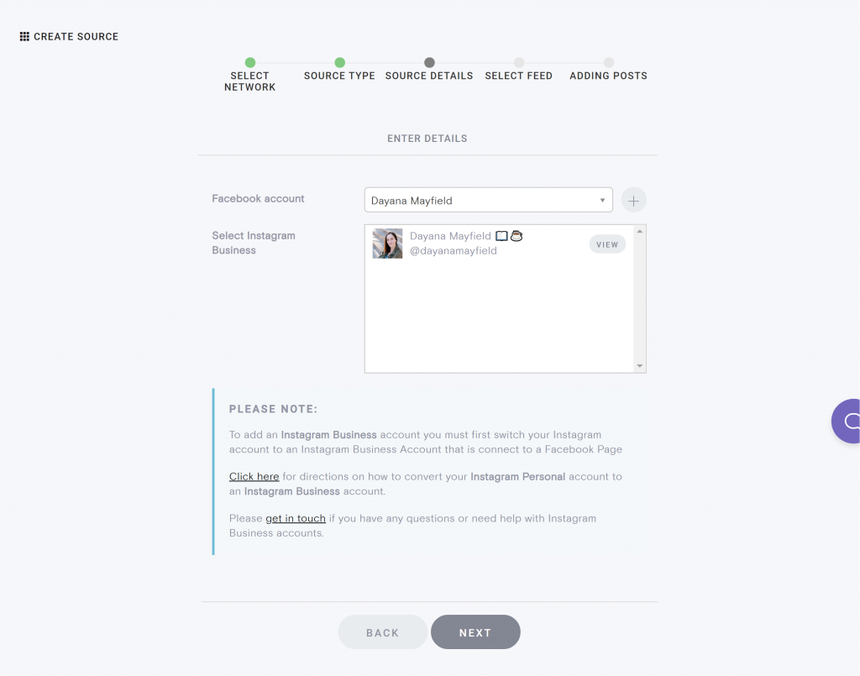
For this tutorial, we'll go with an Instagram business account. You just sync in via Facebook and select the associated Instagram business account you want to use.
Step 2: Curate your feed
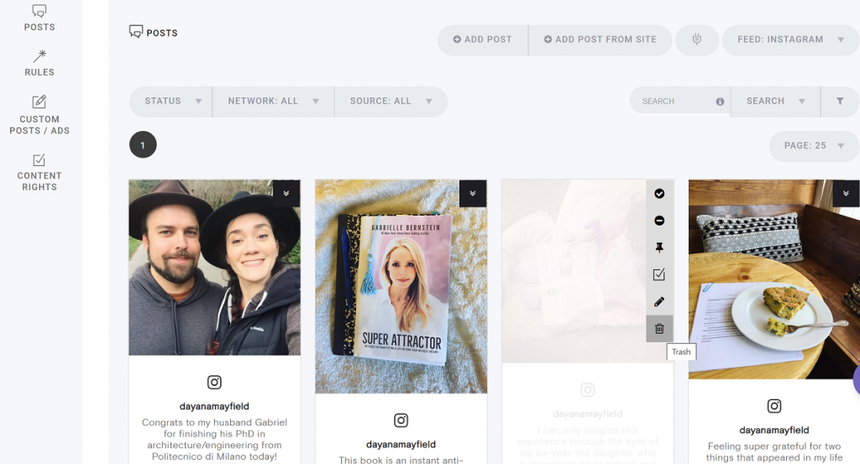
Next up, it's time to curate your feed. You can remove the images that you don't want showing up in the feed you'll embed on your website. You should also update the settings for automatic curation. Do you want everything to be automatically approved to show up on your site? Or do you want to have to greenlight each image?
Step 3: Design your feed
The next step is to update the design of your feed.
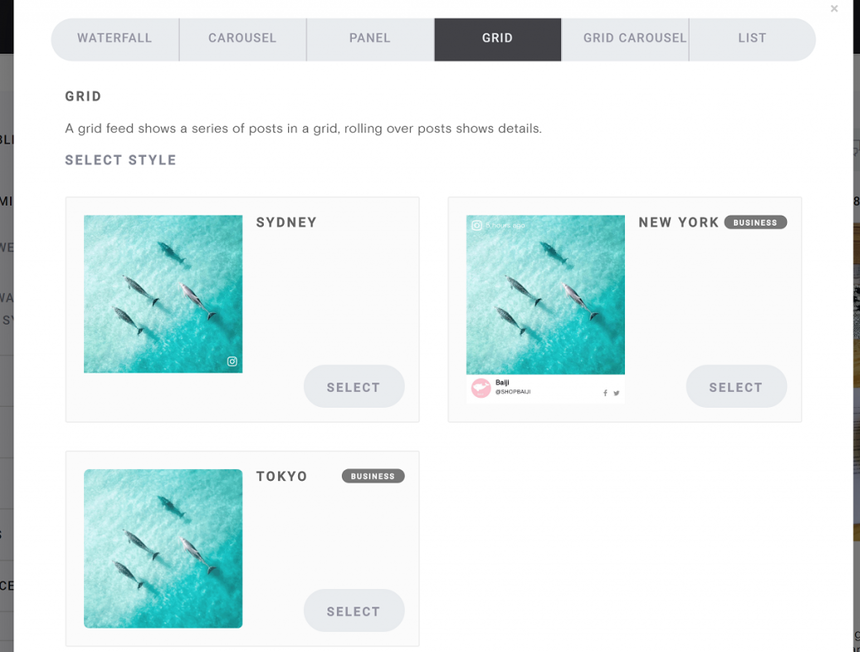
You can choose from our pre-set designs that include different ways of portraying the captions. Some designs let you hover over the image to see the captions, while others put the caption below or next to the image.
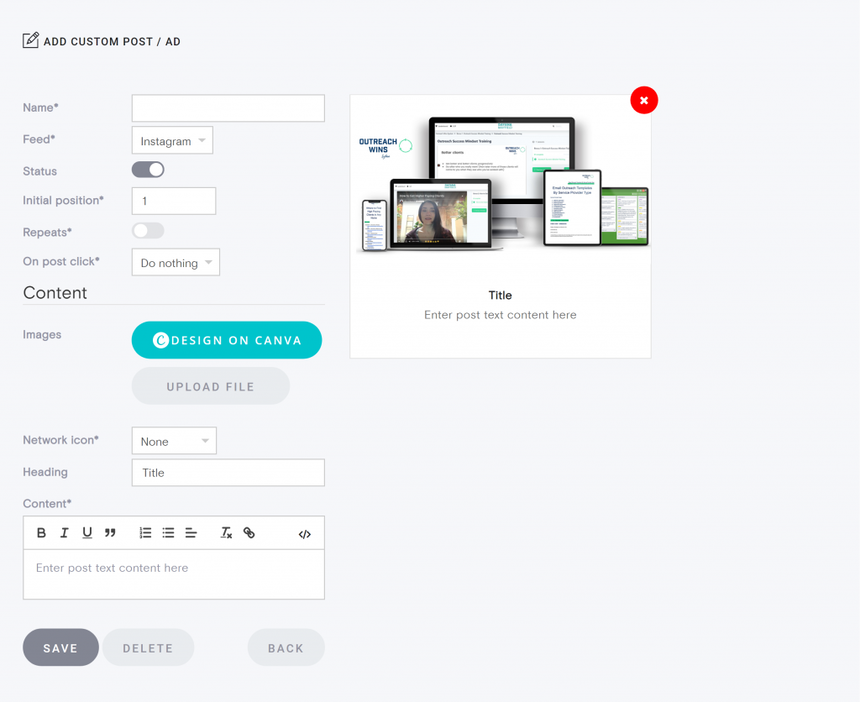
If you want, you can even upload your own custom posts to your feed. Yup, these are images that you didn't upload on Instagram. You might want to do this if you're promoting a product or a freebie offer.
Step 4: Copy the HTML code into your site
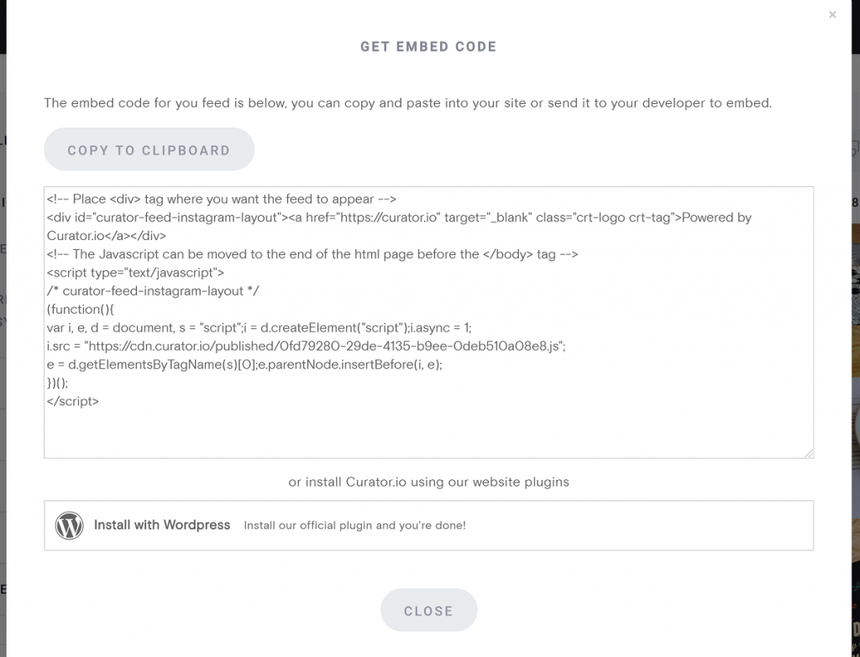
Finally, it's time to embed the HTML code into your website. Just hit "Get code" and then "Copy to clipboard."
Then you can paste it wherever you want: a section of your home page, a blog post, a landing page, or even the sidebar of your blog post.
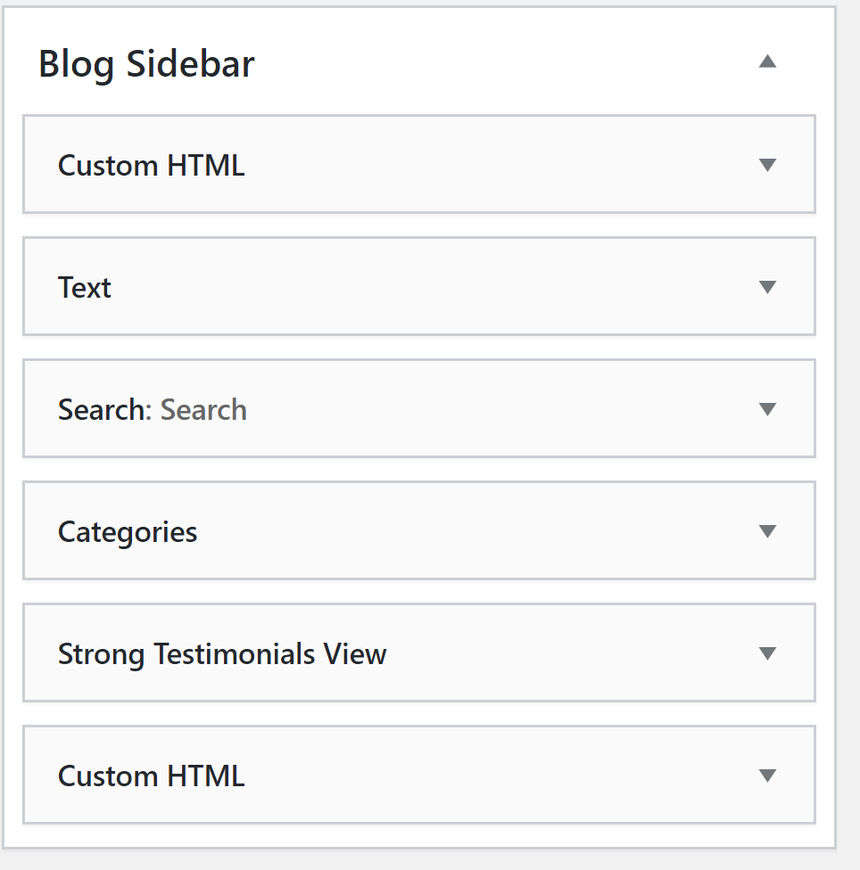
Let's go ahead and add it to the sidebar.
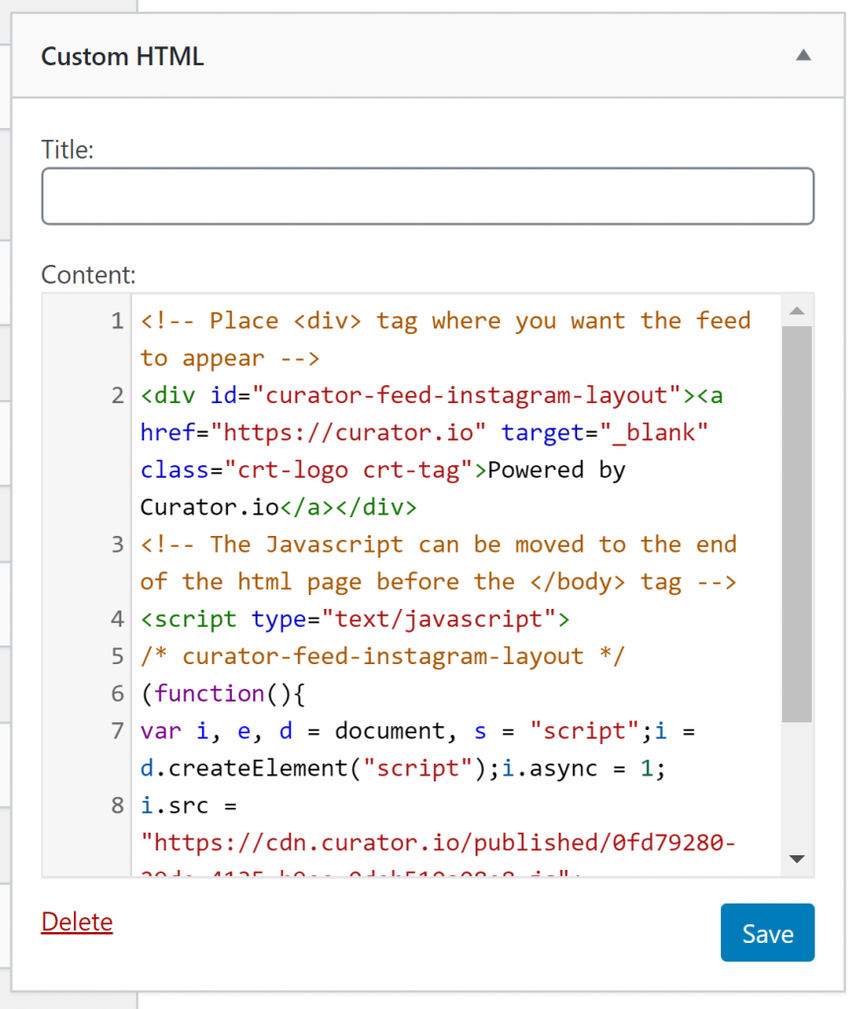
To do embed the Instagram feed HTML code into Wordpress (for free!), we just need to drag and drop a Custom HTML widget over.
Next we paste the HTML code from Curator.io over to the Custom HTML content box. There's no need to add a title, unless you want to. You could write something like, "The latest Instagram posts" or anything creative you can think of.
Step 5. Admire your Instagram feed in your website
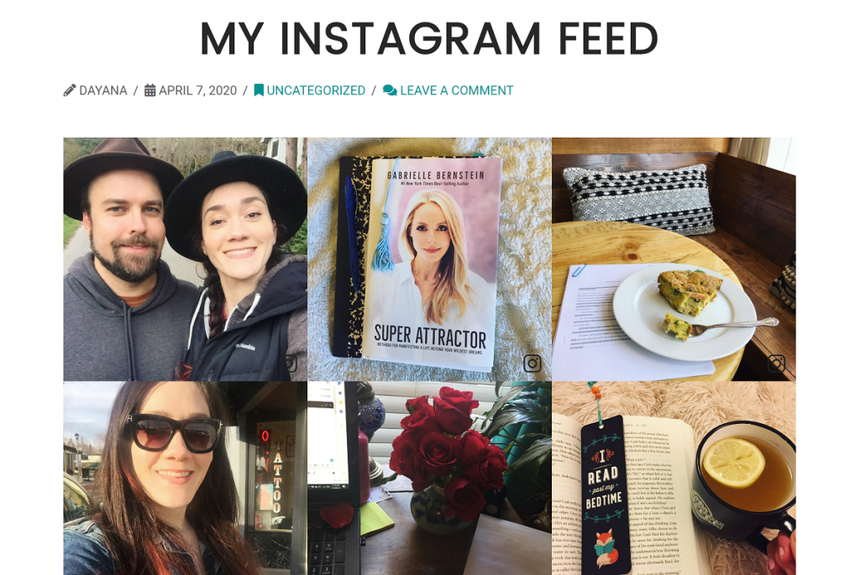
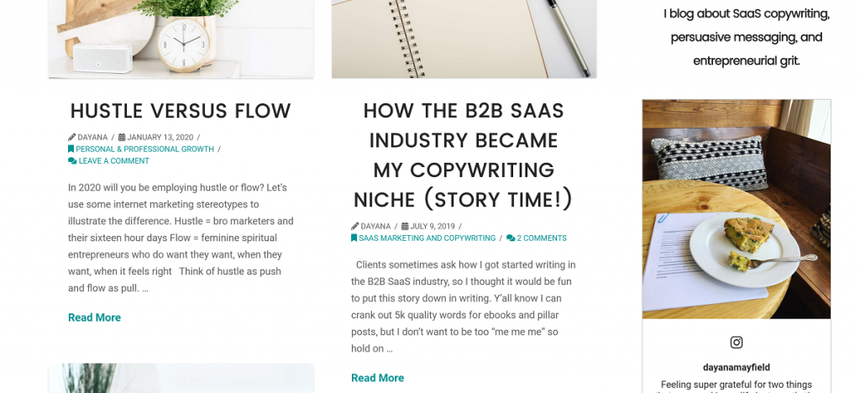
And it's done! Here's what the feed looks like in the sidebar of a blog.
This style puts the caption right below the image and it moves through the posts in an automated slider. It's a very engaging and eye-catching addition to your blog!
But of course, if you prefer a simpler look, you can create a grid style where the captions don't show unless you hover over them, like this example feed:
Curator.io is an easy-to-customize aggregator that lets you pull from over a dozen sources. If you'd like to give Curator.io's free forever plan a spin sign up today.
3 ways to embed Instagram content in your site
While the above is the simplest and easiest way to embed Instagram feeds on your website, there are other ways to do this too.
Maybe you want to embed individual posts, or try other methods for feed embeds, or write your own custom code to create a feed.
Method 1: Adding individual posts
You may want to embed individual posts to your website. While this is easy to do, it can be cumbersome in the long run, because you have to keep on embedding to particular posts. In other words, if you would like this embed to display the most recent post, then you'd need to move back and edit your embed whenever you create a new Instagram post. For most people, who post on a daily basis, this would be a lot of trouble for not much value.
Embedding an individual post is easy. Simply navigate underneath the post, and you will notice a […] button. Proceed to click this button, and you will see several options, including embed. Tap embed.
Copy the code that will appear. Next, paste it in your WordPress blog post, and it will automatically convert into an embed. You are done! The process is that simple. You may also add extra parameters such as specifying the width of the post, hiding the captions of the post and display just the image with Instagram's frame trappings.
Method 2: Social media aggregators
Instagram does not offer a single box plugin to help you display content from your account. Therefore, to embed your Instagram feeds or entire Instagram profile, you will need to use third-party plugins.
Instagram feed plugins work by allowing you to enter your Instagram account ID and then displaying a gallery of your recent posts. This includes your latest photos, a page, and the sidebar area of your website.
Example: Curator.io
Curator.io is one of the most popular Instagram feed embed tools. Most people like it because it covers several social networks all at once. Curator.io works with Twitter, Facebook, Instagram, YouTube, LinkedIn, Hashtag feeds, and more.
You don't have to do numerous feeds either. Curator.io will let you aggregate all of the different sources into a single embedded feed. In other words, you do not need to have your RSS feeds, Twitter, Facebook, Instagram feeds, and others in different locations and format. You use a single central feed instead.
Using a single feed is more convenient for you and your site visitors. Otherwise, you're looking at a cluttered site that's not pleasant for anyone.
Curator.io offers free versions as well as paid versions. Using the free version, you can still access content from various social media platforms all at once and even filter by hashtag. However, the advantage of the paid version is that get more customization options, refined filtering and many other features you will find useful.
You can start with the free version and once you see the benefits, you'll likely want to upgrade for even more engagement with your Instagram feed and other social feeds.
Curator.io is an easy-to-customize aggregator that lets you pull from over a dozen sources. If you'd like to give Curator.io's free forever plan a spin sign up today.
Example: SnapWidget
SnipWidget isn't just a single widget, but a variety of widgets you may consider to embed posts in several ways. Some of its unique features include:
A simple grid widget that helps display image thumbnails, which as users hover over them, you will see likes as well as replies to the particular post in question. This is fun and interactive.
The second feature that may interest you is the scrolling widget. This feature helps showcase a few selected posts in a line. The posts scroll at your specified rate and only stop if a user hovers over a post, so that they can tap to visit the source. Think of it as a slider on your site's homepage, but with social media posts.
The map widget displays geotagged posts on a Google map. And this can come in handy if you travel a lot, and you would want to showcase several posts from the bucket list trips you have been to all at once. Just like Curator.io, it offers a free version, but you can go for a premium version to access custom CSS, more marketing options and built-in analytics.
As you can see, there are several options and features to choose from.
Example: EmbedSocial
EmbedSocial is also a series of plugins. Perhaps you may have come across some of them, such as EmbedStories, EmbedFeed, EmbedAlbum and EmbedReviews. With the free version, you can access, aggregate and create up to ten Instagram albums or Facebook albums. However, if you are looking to increase the number of data sources or turn your gallery into a shop, then you may consider a premium version.
Example: Tagembed
With Tagembed, you can add content from Instagram, Twitter, Facebook, Slack, and other channels. You can also embed not only content from profiles but also from hashtags. This is great if you have a branded hashtag for user generated content or if you have a wedding hashtag. With Curator, you can also embed content from hashtags, not just profiles.
Method 3: Custom code
If you are tech savvy and you can code, you may also consider writing a plugin code yourself. You will need to apply for a token for authentication allowing you to access the Insta API (and this where things get tricky for most programmers).
To begin with, following several privacy breaches, Instagram is in the process of changing their API. There is an accelerated plan to drop their API in favor of Facebook Graph API. The potential outcome you should expect from this move is getting rid of ID which enabled you to aggregate photos from other users.
One issue with creating your own plugin is you'll also be required to update it yourself as Instagram makes changes. With every change, your Instagram feed will become unavailable until you're able to update the code. Doing this and applying again could take days or weeks, which leaves site visitors thinking your site is incomplete.
If you don't want to do it yourself, you can hire someone to create an Instagram embed plugin for you. This works well for custom websites or when you need a highly customized look and feel for your embedded Instagram feed. If you choose custom software development, it will help meet your concerns and key needs.
Benefits of Adding Instagram Feeds
The options for embedding Instagram feeds above do vary in difficulty. However, choosing the right one or even the right combination is beneficial for your brand and can strengthen your brand identity. Becoming an authority in your niche is crucial for gaining more organic traffic.
Embedded Instagram feeds showcase your expertise on your website. For people who may not be on Instagram, this offers additional exposure to your expertise. Think of it as additional site content. Giving your visitors more is always a great idea.
Plus, you're increasing the visibility of your Instagram posts. While Instagram's daily active user base is substantial, it's still not as huge as its parent company, Facebook, which has over a billion daily active users.
Some of the biggest benefits of embedded Instagram feeds include:
Creating a seamless experience between Instagram and your website.
Bring user-generated content from Instagram straight to your site.
Providing social-proof.
Displaying your social media presence.
Encourage more conversation.
Get involved in trends.
Give your website a beautiful update.
Embedded Instagram feeds are only effective, though, if you stay active on the platform. Don't forget, you can also embed more than just your own personal feed. Use hashtags to also embed feeds mentioning your brand. Just make sure you monitor posts to avoid irrelevant posts. Display social proof is a proven way to increase sales and leads driven by your website. This can come in the form of reviews, user-generated content such as Instagram Feeds or product/ service awards.
Ready to start bringing your Instagram and website followers together?
Curator.io is an easy-to-customize aggregator that lets you pull from over a dozen sources. If you'd like to give Curator.io's free forever plan a spin sign up today.